


Start accepting crypto payments in minutes

Send invoices right from your phone as a link, a PDF, or a Telegram message. For your site and bot — a payment page under your brand and an API. The rate is locked for the payment window.

You connect inside the KashBi app. No company check — just a quick identity check (KYC) that takes a few minutes.

API docs
0.4%
per paid invoice, no monthly fee
16 currencies
to price your invoices in
1 minute
to send an invoice from your phone

Accepted coins

  • USDT
  • BTC
  • ETH
  • GRAM
  • TRX
  • XMR
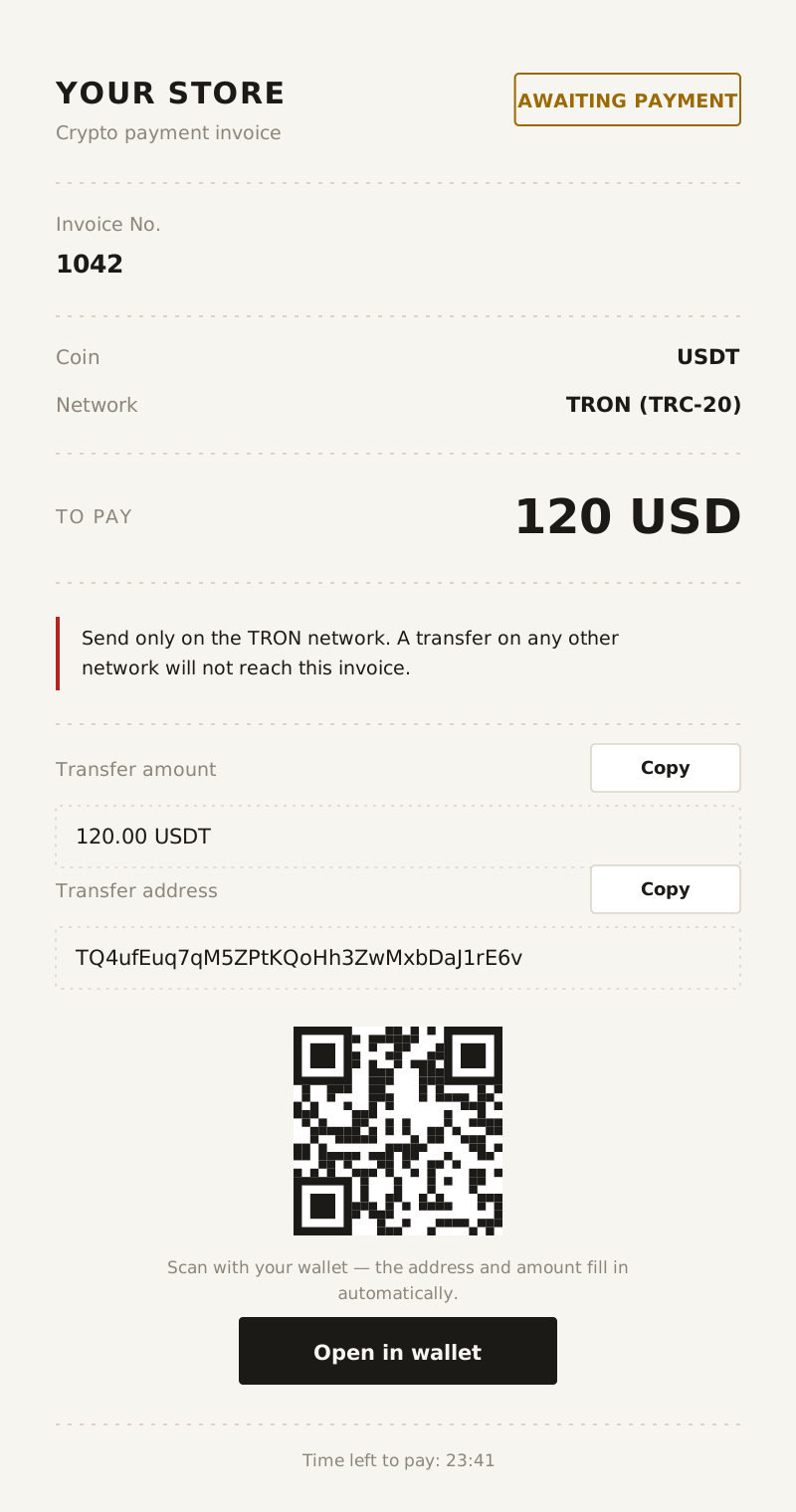
KashBi invoice payment page with the amount, coin, network, address, and QR code

Who KashBi is for

Digital goods, subscriptions, and services in Telegram — businesses with customers worldwide who find it easier to pay in crypto.

Sell worldwide without chargebacks

Software, keys, subscriptions, AI services, and online courses: prices in the customer's currency, a payment page in their language.

  • Prices in 16 fiat currencies
  • Invoices with taxes and business details for B2B clients
  1. 1Payment on your site
  2. 2“Paid” webhook
  3. 3Key or access goes out automatically

An invoice in a minute — right from your phone

Your merchant dashboard lives in KashBi inside Telegram. Send an invoice at a meeting, on the go, or right in the chat with your customer.

  1. 1

    Enter the amount in your currency or add goods and services

  2. 2

    Pick a coin or let the customer choose

  3. 3

    Send the invoice to your customer

How to send an invoice

As a Telegram message

An invoice card with a preview goes straight to the customer's chat from KashBi.

As a PDF invoice

A document with your logo, business details, signature, and stamp.

As a link

For any messenger, email, or social network.

As a QR code

The customer scans it right off your screen.

You hear about the payment right away: a notification arrives in Telegram.

Your brand, not ours

Customers see your store — on the payment page, on your website, and in the PDF invoice.

White-label payment page

The payment page shows your store name and logo.

  • Logo, payment purpose, and order contents
  • After paying, customers return to your link

Checkout right on your site

Open the payment page on your own website — customers pay without leaving it.

  • Embedding works only on domains you allow
  • Your site learns about the payment right away
  • No redirect to someone else's domain

Branded PDF invoice

Set up how your invoice looks. You see the changes in a preview before you save them.

  • Seller logo and business details
  • Signature — upload a file or draw it
  • Company stamp
  • Tax included or added on top, with your own rate and name

Invoices in a minute, settings that fit your business

A simple invoice takes a minute. Everything else is configured per store.

KashBi merchant dashboard: list of invoices with filters and statuses

Several stores

Separate keys, logo, business details, and notifications for each site, bot, or line of business.

Amount, items, or a donation

A fixed amount, a list of goods and services, or an amount the customer enters.

Taxes and details

Tax rate and name, included or added on top, business details, and your own invoice numbering.

Coin of choice

Lock the invoice to USDT or let the customer pick any other coin — the amount is recalculated at the current rate.

Price currency

USD, EUR, GBP, AED, INR, NGN, and 10 more — pick one for each invoice.

Telegram notifications

Choose the events: invoice paid, needs a decision, or expired.

What your customer sees

The payment page opens from a link or on your site and needs no sign-up.

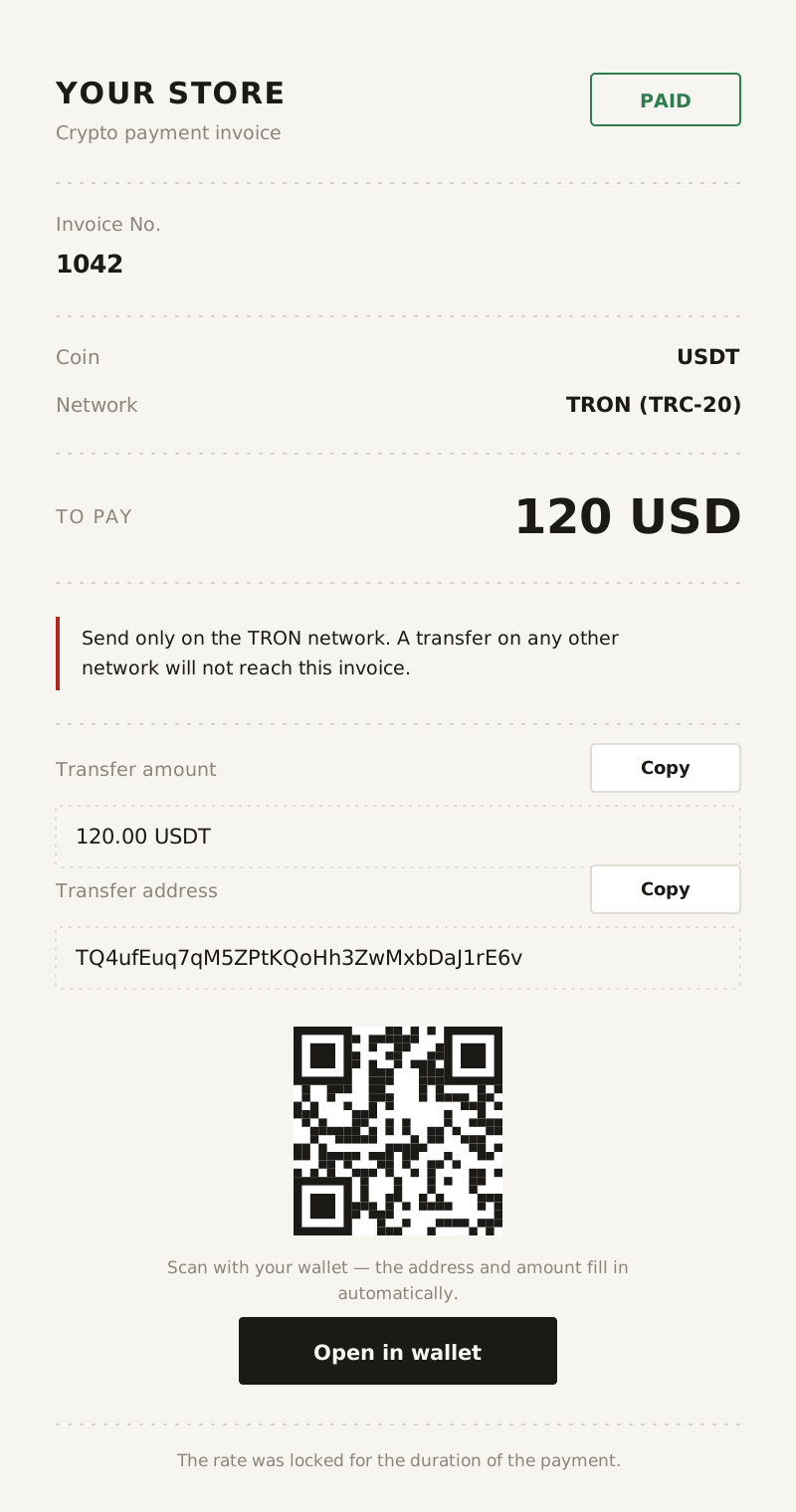
This is what your customer's payment page looks like

No account needed

Customers do not have to sign up for KashBi — any wallet will do.

Coin of choice

If you have not set a coin, the customer picks the coin and network, and the amount is recalculated at the current rate.

QR code and wallet button

The address and amount fill into the wallet automatically, so fewer transfers go wrong.

Payment status on screen

Customers see right away that their transfer has arrived — no more “I paid, where's my order?”.

When a payment does not go to plan

A customer may pay a little less, pay late, or send too much. Each case has a rule, and the decision stays with you.

  1. Slight underpayment

    A small shortfall — say, from the customer's exchange fee — does not block the order. You set the threshold in your store settings or turn it off.

  2. Partial payment

    The invoice waits for your decision: accept what arrived, extend the window for the rest, or cancel and refund.

  3. Transfer after expiry

    The money is not credited automatically. You accept it at the invoice rate or send it back to the customer.

  4. Overpayment

    Anything above the invoice amount is not lost: it is credited to your balance as a separate receipt.

  5. Refund to the customer

    Uncredited funds can be returned to the customer's address on the same network, right from the invoice card.

Invoices that need a decision are flagged in your dashboard, and you get a Telegram notification about them.

Money and security

What happens to a payment after the transfer.

Protection from “dirty” crypto (AML)

Every incoming payment is checked automatically for links to fraud, hacks, darknet markets, or sanctioned addresses. Suspicious funds are not credited to your balance until the compliance team reviews them, so they never mix with your money or cause trouble when you withdraw to an exchange.

Credited to your KashBi balance

Once paid, the amount minus the fee lands on your balance in the same coin. You can withdraw it to an external wallet, to fiat, or as cash through partner exchange points, or exchange it or sell it via P2P — all in one app.

No chargebacks

A blockchain transfer cannot be disputed through a bank. Only you can refund a customer.

Pricing

The fee is charged only on paid invoices, and there is none at all for XMR and GRAM.

0.4%

of every paid invoice

  • No monthly fee and no setup fee
  • The rate is fixed in the invoice and does not change after it is created
  • Several stores in one account
Coins and fees
CoinFee
USDT0.4%, min. 1 USDT
BTC0.4%
ETH0.4%, min. 0.0002 ETH
TRX0.4%, min. 1.5 TRX
GRAMNo fee
XMRNo fee

Why 0.4% and not “0%”

Zero-fee services build the fee in somewhere else. We show the full price up front.

“0%” elsewhere

  • A high fee for withdrawing your money
  • A conversion rate worse than the market — the difference goes to the service
  • A high minimum invoice — say, 50 USD or more

KashBi

  • 0.4% of each paid invoice, shown up front
  • Market rate in the invoice, no markup for the customer
  • Invoices from 3 USD — fits subscriptions and donations
  • An AML check on every payment is already included in the 0.4% — dirty coins never reach your balance

How to get started

  1. 1

    Open KashBi

    In Telegram or in your browser — there is nothing to install.

  2. 2

    Complete a quick identity check (KYC)

    Verify your identity in the app. No company check required.

  3. 3

    Start accepting payments

    In Crypto acquiring, tap Connect and send your first invoice — as a link or through the API.

For developers

One request creates an invoice, and once the customer pays, your site or bot finds out on its own and delivers the product or access without you lifting a finger.

Test mode

Check the whole integration without real money: simulate payment, underpayment, late payment, and cancellation, and make sure your site or bot reacts correctly.

Open the docs
Create an invoice
POST /invoices
X-API-Key: ca_test_••••••••
Idempotency-Key: order-1042

{
  "fiat": "USD",
  "amount": "150.00",
  "coin": "USDT",
  "orderId": "1042",
  "returnUrl": "https://shop.example/thanks"
}

Questions and answers

The short version on getting started, money, and integration.

Money

Who pays the network fee?

The customer — it is part of their transfer. You pay only the KashBi fee: 0.4% of each paid invoice, and nothing for XMR and GRAM.

When does the money become available?

Funds are credited to your balance automatically as soon as the network confirms the transfer.

What if the customer sends the wrong amount?

A small shortfall within your threshold is accepted automatically; other cases wait for your decision: accept, extend, or refund.

Can I refund a customer?

Yes, if the coin supports it: refunds are available for USDT, BTC, ETH, GRAM, and TRX, but not for XMR. Uncredited funds — a partial or late payment — can be returned to the customer's address on the same network, right from the invoice card. To refund a payment that has already been credited, contact support.

Setup and integration

Do I need a company to accept payments?

No. Completing KYC as an individual is enough — no company check is required.

Will my customer see the KashBi brand?

On the payment page and in the PDF invoice, customers see your store name and logo. The PDF footer carries only a small “Powered by KashBi” line. Embedded checkout opens right on your site, while a standalone link leads to the payment page on the KashBi domain.

Are there CMS plugins?

Plugins for popular CMS platforms are coming soon. Until then, connect your site or bot through the API or by embedding the payment page, or use payment links with no development at all.

Restrictions

What can't I sell through KashBi?

Goods and services that are banned or restricted by law, unlicensed gambling, pyramid schemes, unlicensed crypto exchange, coin mixing, and anything involving sanctioned persons.

Send your first invoice now

After KYC, you connect payments with one tap, and your first invoice can go out from your phone a minute later. Questions? Support answers in Telegram.